Constructable vs INGENIOUS.BUILD: Which is Better in June 2026?
Compare Constructable vs INGENIOUS.BUILD for GCs in June 2026. See which construction software fits your workflow, pricing, and field team needs better.
When a mid-size GC starts shopping for construction management software, two names come up often enough to warrant a closer look: Constructable and INGENIOUS.BUILD. On the surface, both cover project management and financials. But the closer you look, the clearer it becomes that they were built for different buyers with different priorities. One is structured around portfolio-level financial oversight for developers managing multiple assets. The other is built for the GC running commercial work day to day, where drawings sit at the center of everything, and field teams need to move fast. That difference shapes every part of how each system works.
TLDR:
- Constructable unifies bidding, RFIs, submittals, drawings, and financials in one system with flat pricing and no per-user fees.
- RFIs and quality items pin directly to exact drawing locations, so field teams never lose context on where issues live.
- INGENIOUS.BUILD focuses on portfolio-level financial oversight for developers, not day-to-day GC workflows.
- Onboarding averages under 21 days with unlimited storage and two-way sync to QuickBooks Online and Sage Intacct.
What is INGENIOUS.BUILD?
INGENIOUS.BUILD is a construction project management solution built around three core modules: Project Financials, Project Management, and Construction Administration. The system is designed to serve a wide range of users, including real estate developers, architects, engineers, specialty trades, and general contractors.
Where INGENIOUS.BUILD puts its weight is in financial management. Real-time dashboards, budget tracking, and portfolio oversight are central to the product's structure. If you're a developer managing multiple assets across a portfolio, that framing makes some sense.
For a mid-size GC running commercial work day to day, though, the picture gets a little murkier. A system organized around financial modules and broad stakeholder coverage can feel like it was built for the developer's boardroom, not the superintendent's trailer. That's not a knock on the product. It just tells you who it was designed for and what it considers a priority.
What is Constructable?
Constructable started in 2023 with a pretty specific frustration in mind: mid-size GCs were drowning in software. Not because they didn't have enough tools, but because they had too many that didn't talk to each other.
Built for mid-size commercial GCs running $20M to $150M in annual volume, Constructable keeps everything from bidding through closeout in one place. RFIs, submittals, drawings, daily logs, quality lists, change orders, photos, and financials all live together. No stitching together five logins. No duplicate data entry between systems.
What sets Constructable apart structurally is where drawings sit in the workflow. They aren't a file repository tucked in a corner.
Drawings as the Center of the Project
In Constructable, drawings are the starting point for everything that happens on a project. Work originates from the plans. Nothing gets created elsewhere and cross-referenced back after the fact. That keeps every question, issue, and markup tied to the exact location where it matters. A few things that show up right away in day-to-day use:
- RFIs get pinned to exact sheet locations, so context is never lost when questions come up in the field.
- Quality items tie back directly to the plans, keeping issues connected to where they actually exist on the project.
- Markups, comments, and questions all live where the work is, which is how field teams think.
That same logic carries through to how the rest of the system is set up—every part of the product is organized around the project, not around abstract modules or configuration hierarchies.
Project-First Workflows vs. System Hierarchy
The way a tool is organized tells you a lot about who it was designed for. If you have to think about where something belongs before you can create it, the software is working against you.
INGENIOUS.BUILD
Reviews on GetApp point to a learning curve tied to the system's structure. The hierarchy can feel inverted for GC work: objects get created first, then associated with a project after the fact. For a developer managing a portfolio, that abstraction might make sense. For a super trying to log a delivery or fire off an RFI before noon, it adds steps that simply shouldn't be there.
Constructable
Everything starts with the project because that's how GCs think. You open a project, and the work lives there. RFIs, markups, daily logs, and punch items are all created within context, not assembled after the fact. There's no configuration tax every time you start something new.
The system makes the structural decisions for you. There's no configuring where things live or how work gets organized; that's already built in, so your team spends less time figuring out the software and more time doing the actual work. Field guys shouldn't have to think about software architecture. They should be able to open an app and get to the sheet they need.
| Feature | Constructable | INGENIOUS.BUILD |
|---|---|---|
| Workflow Structure | Project-first organization where all work items are created within project context. No configuration required before starting work. | Object-first hierarchy where items are created, then associated with projects. Requires understanding system architecture before creating work items. |
| Drawing Collaboration | Drawings are central to all workflows. RFIs and quality items pin directly to exact sheet locations with AI-powered measurement tools, side-by-side comparison, and offline access. | Drawings included in Construction Administration module. Limited public documentation on markup tools, offline access, or whether issues can be pinned to specific sheet locations. |
| RFI Management | RFIs created directly on drawings with location pins. Stay in draft until opened; ball-in-court tracking surfaces responsible parties; AI drafts distribution messages; markups auto-save to RFI context. | RFI workflows included with approval routing and real-time data sharing. Unclear whether RFIs connect directly to drawing locations or exist as standalone log entries. |
| Financial Focus | Built around GC cost management: budgets, commitments, contracts, change management. Two-way sync with QuickBooks Online and Sage Intacct. Change orders auto-group under parent change events. | Portfolio-level financial oversight with automated cost reporting, cash flow forecasting, multi-currency support, and developer-focused budget tracking across multiple assets. |
| Pricing Model | Flat fee with no per-user charges and unlimited storage. No extra fees for setup or data migration. | Per-user, per-month pricing with volume discounts. The more users on the account, the lower the cost per user. |
| Onboarding Timeline | Averages under 21 days with a pre-built structure that eliminates weeks of workflow configuration. | Onboarding timeline not publicly documented. User reviews mention learning curve tied to system hierarchy. |
Drawing Collaboration and Field Execution
For a superintendent, drawings aren't a feature. They're the job. Everything else on the project either connects back to the plans or it doesn't, and that gap shows up fast when something goes wrong in the field.
INGENIOUS.BUILD
INGENIOUS.BUILD's Construction Administration module covers drawings, submittals, inspections, and quality management. It's built to bridge office and field collaboration, and on paper, that covers the bases. That said, there's limited public information about how the drawing viewer actually works for field teams. Markup tools, offline access, and whether issues can be pinned to exact sheet locations aren't well documented. That opacity matters if field adoption is something you care about.
Constructable
The drawing viewer is where our product earns its keep. A few things that matter for day-to-day field work:
- RFIs and quality items pin directly to exact sheet locations, so whoever opens that drawing later sees exactly where the question or issue lives
- Measurement tools include AI-powered scale detection, so you're not recalibrating every sheet manually
- Side-by-side, split view, and three-mode overlay (Differences, Ghost, Overlay) let you compare any two sheets, including non-consecutive revisions
- Markups and comments save to Topics or RFIs, so nothing floats unattributed in a pile of red lines
Drawings also work offline. Field teams don't lose access when the trailer's wifi is doing what trailer wifi does, and the mobile app mirrors the desktop experience without a stripped-down version that leaves you working with half the tool.
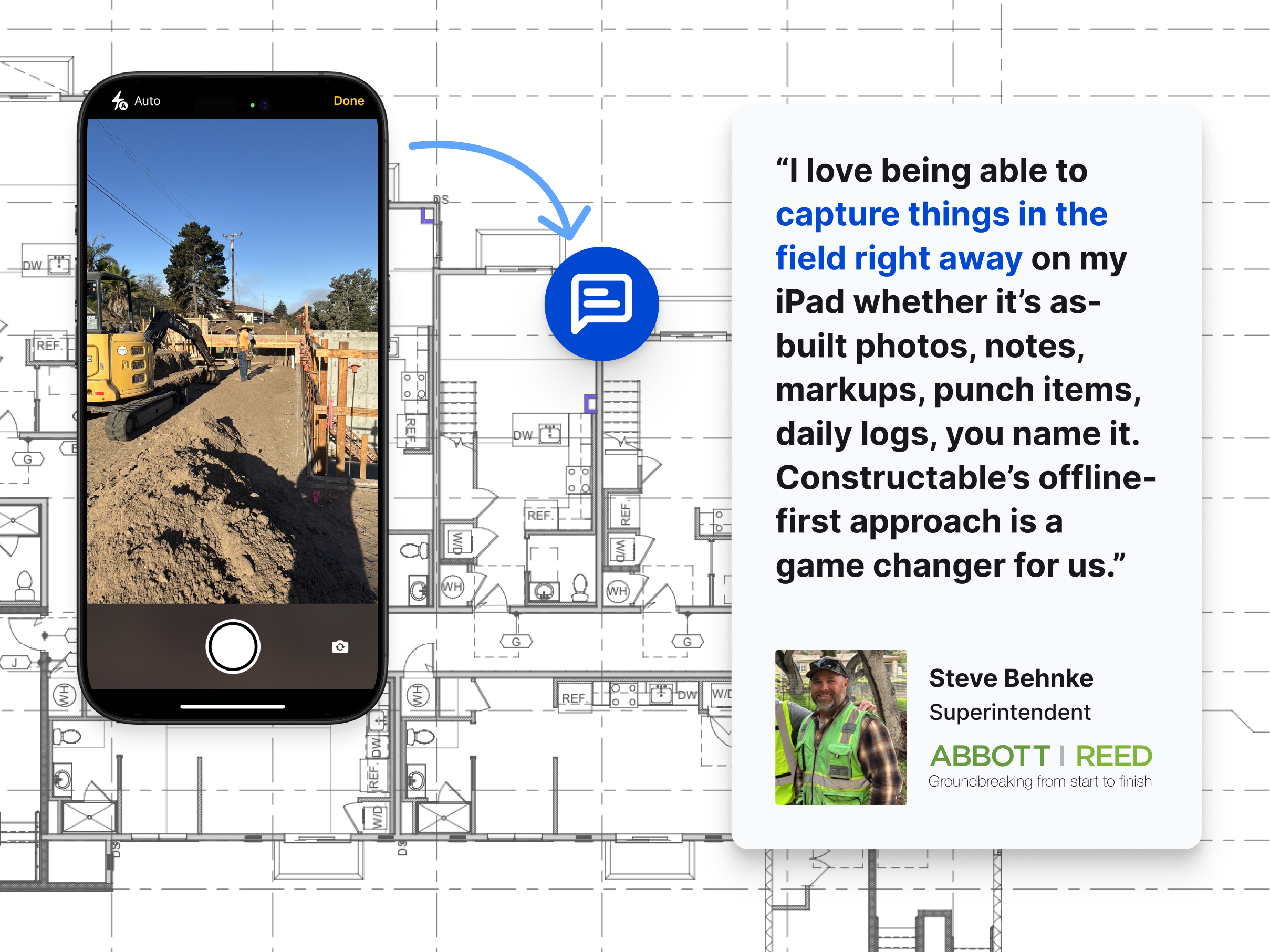
The practical result is fewer calls between the office and the field asking, "Which sheet are you looking at?" That question costs more time than it sounds like.
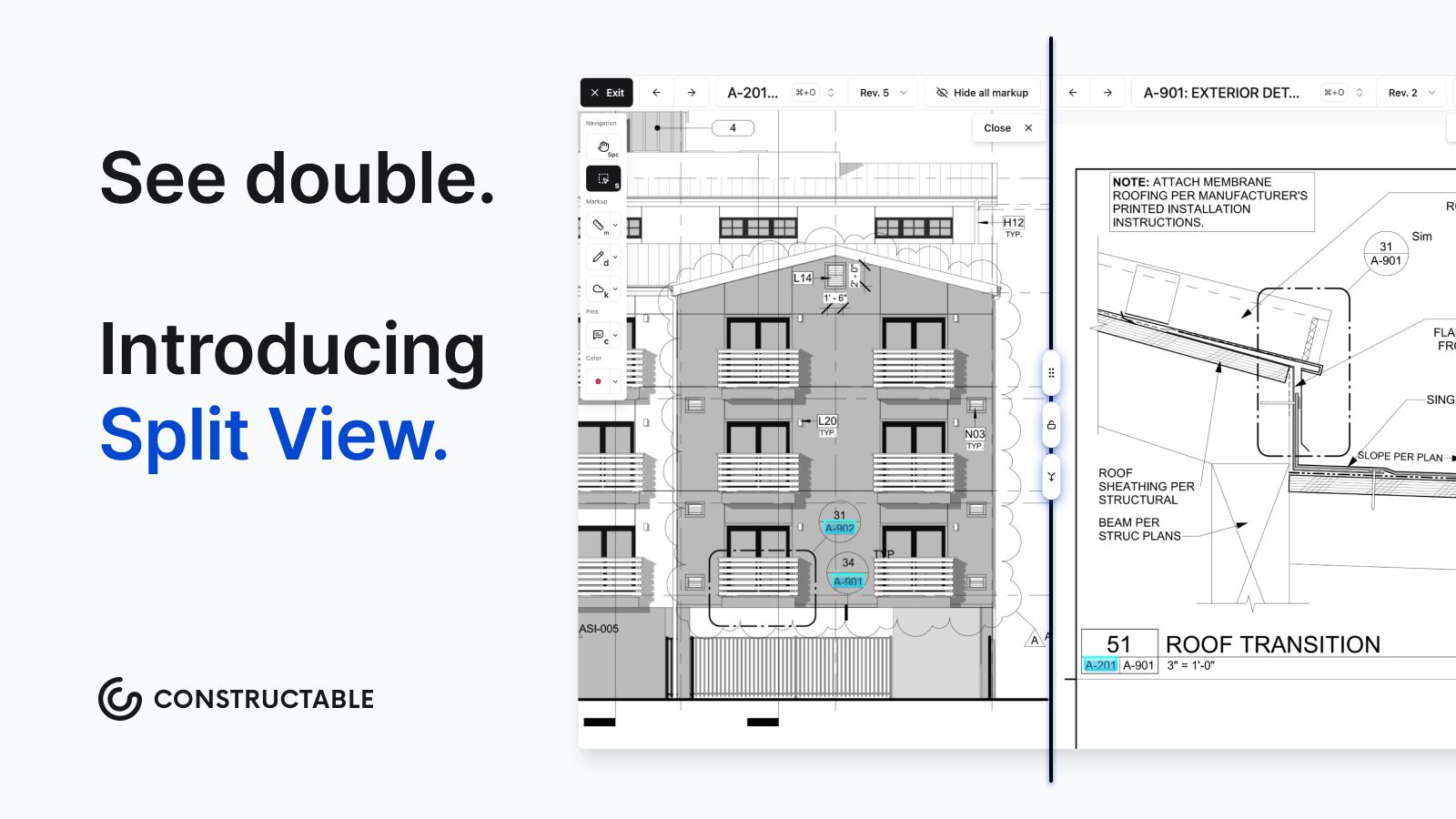
Constructable lets you view two sheets or revisions at the same time using Split View.
RFI Management and Ball-in-Court Tracking
RFIs can make or break project timelines; a question sits unanswered, the crew waits, the schedule slips. Unanswered RFIs are one of the most common causes of construction delays and cost overruns, as Navigant Construction Forum RFI research has documented.
INGENIOUS.BUILD
The system includes RFI workflows within its Construction Administration module, with approval routing and real-time data sharing. That covers the formal process side. What's less clear is whether RFIs connect directly to drawing locations or exist as standalone log entries divorced from the actual plans. For a GC trying to communicate "this question is about grid line C4 on sheet A3.2," that distinction matters.
Constructable
RFIs in Constructable start on the drawing. You place a pin at the exact location the question is about, and the RFI lives there. Anyone who opens that sheet later sees exactly where the issue is without having to interpret a written description.
A few other things worth knowing:
- RFIs stay in draft until you explicitly open them, so you can fill in details without triggering notifications prematurely
- Ball-in-court assignments surface at the top of the log once an RFI is open, so whoever is responsible can't miss it
- Any markups made while an RFI is open save automatically to that RFI
- When closing, AI drafts the distribution message so you're not writing the same summary email for the fourth time this week
- Sheet markups export to PDF with one sheet per page, clean enough to send to an architect without embarrassment
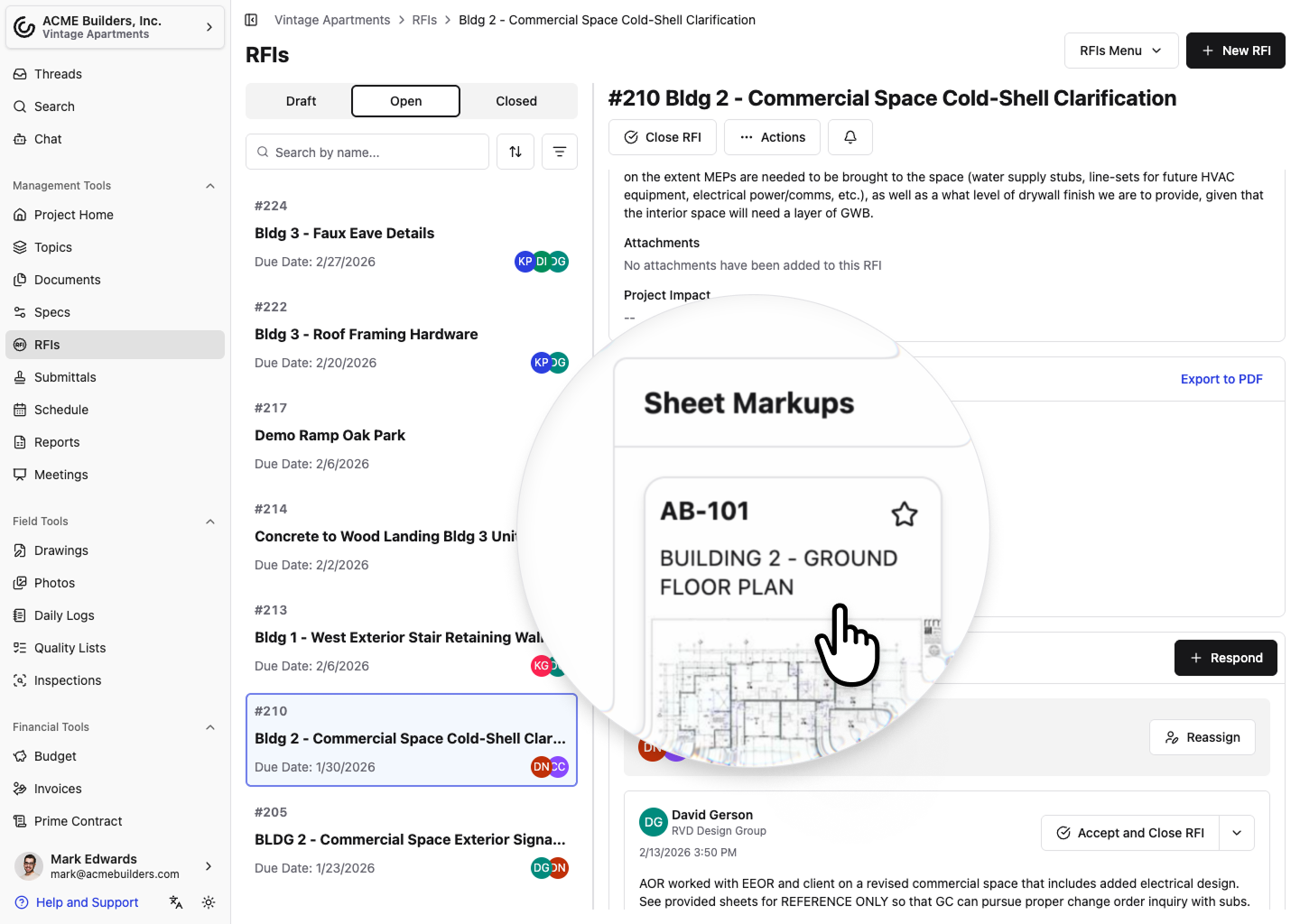
Jump straight to marked-up sheets from RFIs
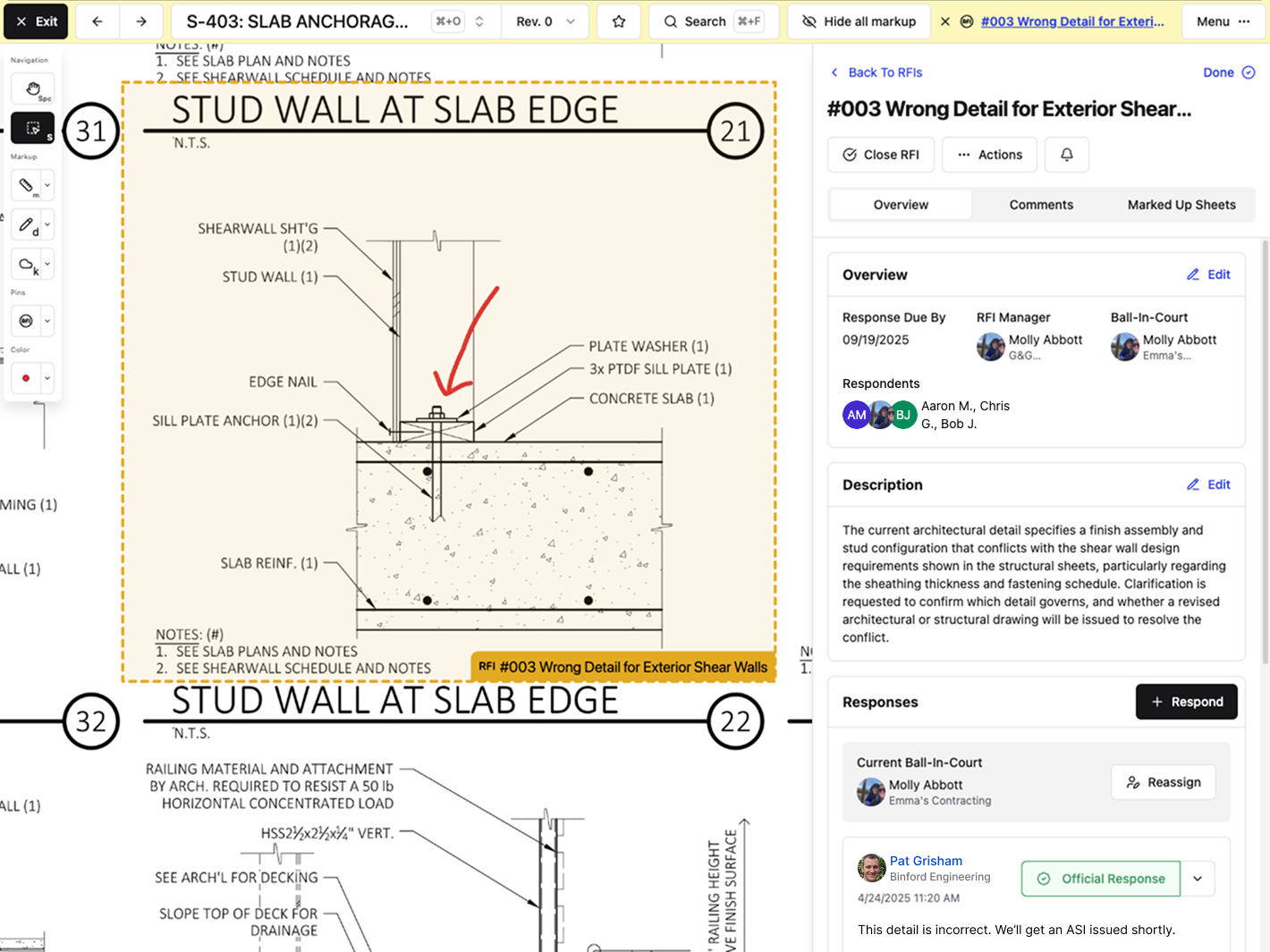
You can also open an RFI from a pinned area directly within the Drawing Viewer
Financial Management and Project Cost Visibility
INGENIOUS.BUILD's Project Financials module covers a lot of ground: automated cost reporting, cash flow forecasting, approval workflows, bid packages, and multi-currency support. For a developer managing assets across multiple phases and geographies, that breadth makes sense. The system was built for owner-level visibility.
For a mid-size GC running a handful of commercial jobs, though, portfolio-level forecasting across currencies isn't the gap they're trying to close on a Tuesday morning.
Constructable
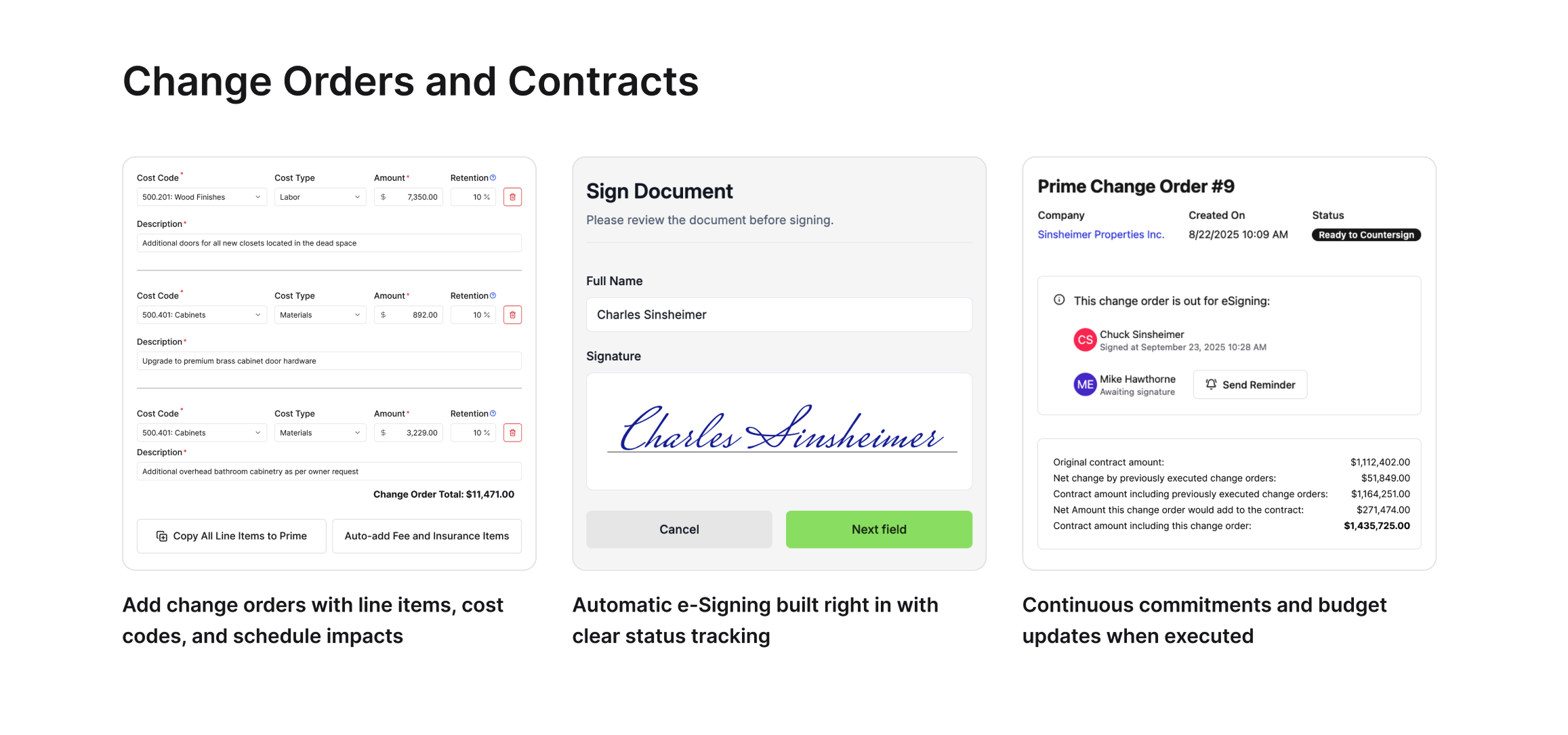
Our financial tools are built around how GCs actually manage cost: budgets, commitments, contracts, and change management. Change orders automatically group under their parent change event, so related modifications stay organized without manual sorting.
Two-way sync with QuickBooks Online and Sage Intacct means your accounting doesn't live in a separate silo. Constructable is an Official Sage Partner.
Built-in eSigning handles signatures without printing, scanning, or a third-party tool. According to an FMI study on construction data costs, poor communication and bad project data carry a $31 billion price tag annually in the U.S.—a gap that two-way synced financial and field tools directly address.
Why Constructable is the Better Choice
INGENIOUS.BUILD makes sense for developers needing portfolio-level financial oversight across multiple sites. That's a real use case. It's just not the GC use case.
For mid-size commercial GCs, Constructable is built around how you already work. Projects first, drawings at the center, and every workflow tied back to the plans. RFIs pin to sheets. Punch items live on drawings. AI handles the friction points without asking you to learn something new. Field teams can open the app on day one and get moving without a training session or an IT consultant.
Here's what that looks like in practice:
- Drawings stay at the center of everything, so your team finds what they need where they expect it to be, tied directly to the work happening in the field.
- RFIs and punch items link straight to the sheet they belong to, keeping conversations grounded in the actual plans.
- Onboarding averages under 21 days, and pricing is flat with no per-user fees as your team grows.
Builders shouldn't need a software stack. One connected system beats ten disconnected tools, every time.
If you want software that works the way you do, not the way a developer's boardroom does, Constructable is the straightforward answer.
Final Thoughts on Software Built for General Contractors
When you compare Constructable vs INGENIOUS.BUILD, you're really comparing who each system was designed to serve and whether that matches your daily reality. If your team is tired of logging into multiple tools just to track down one answer, or if RFIs sit in a queue because nobody knows whose court the ball is in, that friction adds up fast. Constructable keeps everything in one place, ties it back to the drawings, and gets out of your way so you can focus on building instead of managing software. Schedule a call to see how it works for your projects.
FAQ
How do I decide between Constructable and INGENIOUS.BUILD for my general contracting business?
It comes down to how you think about your work. If you're a mid-size GC running commercial projects day-to-day, Constructable is built for that. INGENIOUS.BUILD makes more sense for developers who need portfolio-level financial oversight across multiple assets.
What's the best construction drawing management software for a small GC still using email and Dropbox?
Constructable centralizes drawings, RFIs, submittals, and markups in one system where everything pins directly to exact sheet locations. Your field team can find what they need without hunting through email threads or nested folders, and onboarding takes under 21 days with no per-user fees.
Can my superintendent create an RFI directly from the plans without extra steps?
Yes. Place a pin at the exact location on the drawing where the question is, and the RFI lives there with all markups and context attached. The RFI stays in draft until you open it, so you can fill in details without setting off notifications before you're ready.
What's the main difference in how drawings work between the two systems?
Constructable treats drawings as the center of gravity. RFIs, quality items, and markups all pin directly to exact sheet locations so everyone knows exactly what you're talking about. INGENIOUS.BUILD includes drawings in its Construction Administration module, though its drawing tools are built for document access and zone-based tracking rather than pinning issues to exact sheet locations.
How long does it take to get up and running with Constructable?
Most teams finish onboarding in under 21 days, and there are no extra fees for setup or data migration. The system makes structural decisions for you, so you don't have to configure workflows for weeks. You open a project and the work lives there.